- Scikit Image – Introduction
- Scikit Image - Image Processing
- Scikit Image - Numpy Images
- Scikit Image - Image datatypes
- Scikit Image - Using Plugins
- Scikit Image - Image Handlings
- Scikit Image - Reading Images
- Scikit Image - Writing Images
- Scikit Image - Displaying Images
- Scikit Image - Image Collections
- Scikit Image - Image Stack
- Scikit Image - Multi Image
- Scikit Image - Data Visualization
- Scikit Image - Using Matplotlib
- Scikit Image - Using Ploty
- Scikit Image - Using Mayavi
- Scikit Image - Using Napari
- Scikit Image - Color Manipulation
- Scikit Image - Alpha Channel
- Scikit Image - Conversion b/w Color & Gray Values
- Scikit Image - Conversion b/w RGB & HSV
- Scikit Image - Conversion to CIE-LAB Color Space
- Scikit Image - Conversion from CIE-LAB Color Space
- Scikit Image - Conversion to luv Color Space
- Scikit Image - Conversion from luv Color Space
- Scikit Image - Image Inversion
- Scikit Image - Painting Images with Labels
- Scikit Image - Contrast & Exposure
- Scikit Image - Contrast
- Scikit Image - Contrast enhancement
- Scikit Image - Exposure
- Scikit Image - Histogram Matching
- Scikit Image - Histogram Equalization
- Scikit Image - Local Histogram Equalization
- Scikit Image - Tinting gray-scale images
- Scikit Image - Image Transformation
- Scikit Image - Scaling an image
- Scikit Image - Rotating an Image
- Scikit Image - Warping an Image
- Scikit Image - Affine Transform
- Scikit Image - Piecewise Affine Transform
- Scikit Image - ProjectiveTransform
- Scikit Image - EuclideanTransform
- Scikit Image - Radon Transform
- Scikit Image - Line Hough Transform
- Scikit Image - Probabilistic Hough Transform
- Scikit Image - Circular Hough Transforms
- Scikit Image - Elliptical Hough Transforms
- Scikit Image - Polynomial Transform
- Scikit Image - Image Pyramids
- Scikit Image - Pyramid Gaussian Transform
- Scikit Image - Pyramid Laplacian Transform
- Scikit Image - Swirl Transform
- Scikit Image - Morphological Operations
- Scikit Image - Erosion
- Scikit Image - Dilation
- Scikit Image - Black & White Tophat Morphologies
- Scikit Image - Convex Hull
- Scikit Image - Generating footprints
- Scikit Image - Isotopic Dilation & Erosion
- Scikit Image - Isotopic Closing & Opening of an Image
- Scikit Image - Skelitonizing an Image
- Scikit Image - Morphological Thinning
- Scikit Image - Masking an image
- Scikit Image - Area Closing & Opening of an Image
- Scikit Image - Diameter Closing & Opening of an Image
- Scikit Image - Morphological reconstruction of an Image
- Scikit Image - Finding local Maxima
- Scikit Image - Finding local Minima
- Scikit Image - Removing Small Holes from an Image
- Scikit Image - Removing Small Objects from an Image
- Scikit Image - Filters
- Scikit Image - Image Filters
- Scikit Image - Median Filter
- Scikit Image - Mean Filters
- Scikit Image - Morphological gray-level Filters
- Scikit Image - Gabor Filter
- Scikit Image - Gaussian Filter
- Scikit Image - Butterworth Filter
- Scikit Image - Frangi Filter
- Scikit Image - Hessian Filter
- Scikit Image - Meijering Neuriteness Filter
- Scikit Image - Sato Filter
- Scikit Image - Sobel Filter
- Scikit Image - Farid Filter
- Scikit Image - Scharr Filter
- Scikit Image - Unsharp Mask Filter
- Scikit Image - Roberts Cross Operator
- Scikit Image - Lapalace Operator
- Scikit Image - Window Functions With Images
- Scikit Image - Thresholding
- Scikit Image - Applying Threshold
- Scikit Image - Otsu Thresholding
- Scikit Image - Local thresholding
- Scikit Image - Hysteresis Thresholding
- Scikit Image - Li thresholding
- Scikit Image - Multi-Otsu Thresholding
- Scikit Image - Niblack and Sauvola Thresholding
- Scikit Image - Restoring Images
- Scikit Image - Rolling-ball Algorithm
- Scikit Image - Denoising an Image
- Scikit Image - Wavelet Denoising
- Scikit Image - Non-local means denoising for preserving textures
- Scikit Image - Calibrating Denoisers Using J-Invariance
- Scikit Image - Total Variation Denoising
- Scikit Image - Shift-invariant wavelet denoising
- Scikit Image - Image Deconvolution
- Scikit Image - Richardson-Lucy Deconvolution
- Scikit Image - Recover the original from a wrapped phase image
- Scikit Image - Image Inpainting
- Scikit Image - Registering Images
- Scikit Image - Image Registration
- Scikit Image - Masked Normalized Cross-Correlation
- Scikit Image - Registration using optical flow
- Scikit Image - Assemble images with simple image stitching
- Scikit Image - Registration using Polar and Log-Polar
- Scikit Image - Feature Detection
- Scikit Image - Dense DAISY Feature Description
- Scikit Image - Histogram of Oriented Gradients
- Scikit Image - Template Matching
- Scikit Image - CENSURE Feature Detector
- Scikit Image - BRIEF Binary Descriptor
- Scikit Image - SIFT Feature Detector and Descriptor Extractor
- Scikit Image - GLCM Texture Features
- Scikit Image - Shape Index
- Scikit Image - Sliding Window Histogram
- Scikit Image - Finding Contour
- Scikit Image - Texture Classification Using Local Binary Pattern
- Scikit Image - Texture Classification Using Multi-Block Local Binary Pattern
- Scikit Image - Active Contour Model
- Scikit Image - Canny Edge Detection
- Scikit Image - Marching Cubes
- Scikit Image - Foerstner Corner Detection
- Scikit Image - Harris Corner Detection
- Scikit Image - Extracting FAST Corners
- Scikit Image - Shi-Tomasi Corner Detection
- Scikit Image - Haar Like Feature Detection
- Scikit Image - Haar Feature detection of coordinates
- Scikit Image - Hessian matrix
- Scikit Image - ORB feature Detection
- Scikit Image - Additional Concepts
- Scikit Image - Render text onto an image
- Scikit Image - Face detection using a cascade classifier
- Scikit Image - Face classification using Haar-like feature descriptor
- Scikit Image - Visual image comparison
- Scikit Image - Exploring Region Properties With Pandas
Scikit Image − Scharr Filter
The Scharr filter is a type of edge detection filter used in image processing and computer vision. It is designed to compute gradients and edges in images, and it offers better rotation invariance compared to other commonly used edge filters such as the Sobel or Prewitt operators.
This filter is used to enhance the edges and boundaries within an image, which is often an important step in various image processing tasks, including object detection, image segmentation, and feature extraction.
The scikit-image (skimage) library offers three key functions within its filter module for applying the Scharr filter to images, which include scharr(), scharr_h(), and scharr_v().
Using the skimage.filters.scharr() function
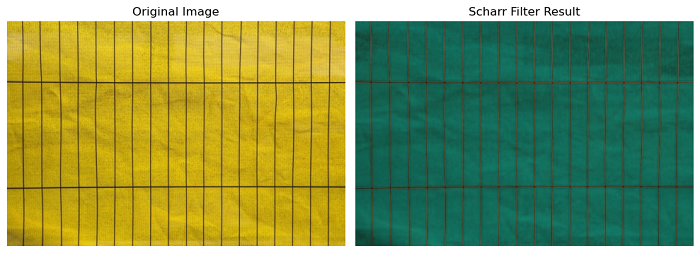
The scharr() function is used to compute the edge magnitude using the Scharr transform on an input image.
Syntax
Following is the syntax of this function −
skimage.filters.scharr(image, mask=None, *, axis=None, mode='reflect', cval=0.0)
Parameters
Here are the details of the parameters −
- image (array): The input image on which the Scharr edge transform will be computed.
- mask (array of bool, optional): this boolean array can be used to clip the output image. Wherever mask is set to 0, the corresponding values in the output image will be set to 0 as well.
- axis (int or sequence of int, optional): This parameter specifying the axis or axes along which to compute the edge filter. If not provided, the edge magnitude is computed. Which is defined as:
sch_mag = np.sqrt(sum([scharr(image, axis=i)**2 for i in range(image.ndim)]) / image.ndim)
Return value
The function returns an array of floats, which represents the Scharr edge map.
Example
Here's a simple example of applying the Scharr filter to an image using the scharr() filter −
import matplotlib.pyplot as plt
from skimage.filters import scharr
from skimage import io

# Load the input image
image = io.imread('Images/lines.jpg')

# Apply the Scharr filter
filtered_image = scharr(image)

# Plot the original and filtered images
fig, axes = plt.subplots(1, 2, figsize=(10, 5))
ax = axes.ravel()

# Display the Original Image
ax[0].imshow(image, cmap='gray')
ax[0].set_title('Original Image')
ax[0].axis('off')

# Display the Scharr Filter Result
ax[1].imshow(filtered_image, cmap='gray')
ax[1].axis('off')
ax[1].set_title('Scharr Filter Result')

plt.tight_layout()
plt.show()
Output
Horizontal and Vertical edge detection using the scharr_h() and scharr_v() functions
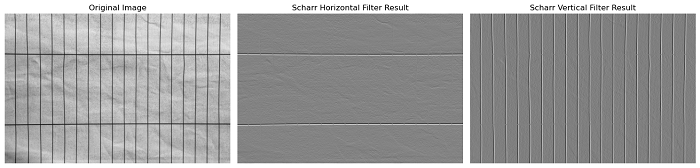
The skimage.filters.scharr_h() and skimage.filters.scharr_v() functions are used to detect horizontal and vertical edges, respectively, in a 2-D image using the Scharr transform. These functions compute the gradients of the image in the horizontal and vertical directions. Both functions return a 2-D array, which represents the Scharr edge map.
Syntax
Syntax for scharr_h() function −
skimage.filters.scharr_h(image, mask=None)
Syntax
Syntax for scharr_v() function −
skimage.filters.scharr_v(image, mask=None)
Parameters
Here is an explanation of the parameters for both functions −
- image (2-D array): This parameter represents the input image on which the horizontal and vertical edge detection using the Scharr transform will be processed.
- mask (optional, 2-D array): mask (optional, 2-D array): An optional mask to limit the application of the Scharr transform to a specific area of the image. Pixels surrounding the masked regions are also masked to ensure they do not influence the result.
Example
This example applies the scharr horizontal and vertical edge detection filters on an input image using the scharr_h() and scharr_v() function −
import matplotlib.pyplot as plt
from skimage.filters import scharr_h, scharr_v
from skimage import io, color

# Load the input image
image = io.imread('Images/Lines.jpg')

# Convert the image to grayscale
gray_image = color.rgb2gray(image)

# Apply the Scharr horizontal filter
filtered_image_h = scharr_h(gray_image)

# Apply the Scharr vertical filter
filtered_image_v = scharr_v(gray_image)

# Plot the original, Scharr horizontal, and Scharr vertical filtered images
fig, axes = plt.subplots(1, 3, figsize=(15, 5))
ax = axes.ravel()

# Display the Original Image
ax[0].imshow(gray_image, cmap='gray')
ax[0].set_title('Original Image')
ax[0].axis('off')

# Display the Scharr Horizontal Filter Result
ax[1].imshow(filtered_image_h, cmap='gray')
ax[1].set_title('Scharr Horizontal Filter Result')
ax[1].axis('off')

# Display the Scharr Vertical Filter Result
ax[2].imshow(filtered_image_v, cmap='gray')
ax[2].set_title('Scharr Vertical Filter Result')
ax[2].axis('off')

plt.tight_layout()
plt.show()
Output