
- Computer Graphics - Home
- Computer Graphics Basics
- Computer Graphics Applications
- Graphics APIs and Pipelines
- Computer Graphics Maths
- Sets and Mapping
- Solving Quadratic Equations
- Computer Graphics Trigonometry
- Computer Graphics Vectors
- Linear Interpolation
- Computer Graphics Devices
- Cathode Ray Tube
- Raster Scan Display
- Random Scan Device
- Phosphorescence Color CRT
- Flat Panel Displays
- 3D Viewing Devices
- Images Pixels and Geometry
- Color Models
- Line Generation
- Line Generation Algorithm
- DDA Algorithm
- Bresenham's Line Generation Algorithm
- Mid-point Line Generation Algorithm
- Circle Generation
- Circle Generation Algorithm
- Bresenham's Circle Generation Algorithm
- Mid-point Circle Generation Algorithm
- Ellipse Generation Algorithm
- Polygon Filling
- Polygon Filling Algorithm
- Scan Line Algorithm
- Flood Filling Algorithm
- Boundary Fill Algorithm
- 4 and 8 Connected Polygon
- Inside Outside Test
- 2D Transformation
- 2D Transformation
- Transformation Between Coordinate System
- Affine Transformation
- Raster Methods Transformation
- 2D Viewing
- Viewing Pipeline and Reference Frame
- Window Viewport Coordinate Transformation
- Viewing & Clipping
- Point Clipping Algorithm
- Cohen-Sutherland Line Clipping
- Cyrus-Beck Line Clipping Algorithm
- Polygon Clipping Sutherland–Hodgman Algorithm
- Text Clipping
- Clipping Techniques
- Bitmap Graphics
- 3D Viewing Transformation
- 3D Computer Graphics
- Parallel Projection
- Orthographic Projection
- Oblique Projection
- Perspective Projection
- 3D Transformation
- Rotation with Quaternions
- Modelling and Coordinate Systems
- Back-face Culling
- Lighting in 3D Graphics
- Shadowing in 3D Graphics
- 3D Object Representation
- Represnting Polygons
- Computer Graphics Surfaces
- Visible Surface Detection
- 3D Objects Representation
- Computer Graphics Curves
- Computer Graphics Curves
- Types of Curves
- Bezier Curves and Surfaces
- B-Spline Curves and Surfaces
- Data Structures For Graphics
- Triangle Meshes
- Scene Graphs
- Spatial Data Structure
- Binary Space Partitioning
- Tiling Multidimensional Arrays
- Color Theory
- Colorimetry
- Chromatic Adaptation
- Color Appearance
- Antialiasing
- Ray Tracing
- Ray Tracing Algorithm
- Perspective Ray Tracing
- Computing Viewing Rays
- Ray-Object Intersection
- Shading in Ray Tracing
- Transparency and Refraction
- Constructive Solid Geometry
- Texture Mapping
- Texture Values
- Texture Coordinate Function
- Antialiasing Texture Lookups
- Procedural 3D Textures
- Reflection Models
- Real-World Materials
- Implementing Reflection Models
- Specular Reflection Models
- Smooth-Layered Model
- Rough-Layered Model
- Surface Shading
- Diffuse Shading
- Phong Shading
- Artistic Shading
- Computer Animation
- Computer Animation
- Keyframe Animation
- Morphing Animation
- Motion Path Animation
- Deformation Animation
- Character Animation
- Physics-Based Animation
- Procedural Animation Techniques
- Computer Graphics Fractals
Vectors in Computer Graphics
Vectors are frequently used in computer graphics to help us describe positions, movements, and directions in both 2D and 3D space. In this chapter, we will see the basics of vectors and their applications in graphics with examples.
Concept of Vectors
As we know from mathematics and physics, a vector is a mathematical object that has both length and direction. We can think of it as an arrow. Two vectors are the same if they have the same length and direction, even if they are in different places.
Vector Representation
We usually show vectors with letters, like 'a'. The length of a vector is written as |a|.

Here 'a' is a vector and it is starting from (0, 0) ending at (2, 2)
Types of Vectors
There are special types of vectors −
- Unit vector − A vector with a length of 1
- Zero vector − A vector with no length (its direction is undefined)
Uses of Vectors in Graphics
Let us talk about several use cases of vectors in computer graphics −
- Offset or Displacement − This is an interesting concept. Here vectors can show how far and in what direction to move from one point to another. For example, "go two steps east and three steps north".
- Location or Position − Another use case is based on locations. The vectors can represent a point's position relative to a starting point (origin).
Vector Operations
Let us talk about several operations associated with vectors. We call them vector algebra. We already know these things but here we will see a basic recap.
Vector Addition
The most common operation is addition for vectors. To add vectors, we use the parallelogram rule. Place the tail of one vector at the head of the other. The sum is the vector that completes the triangle.
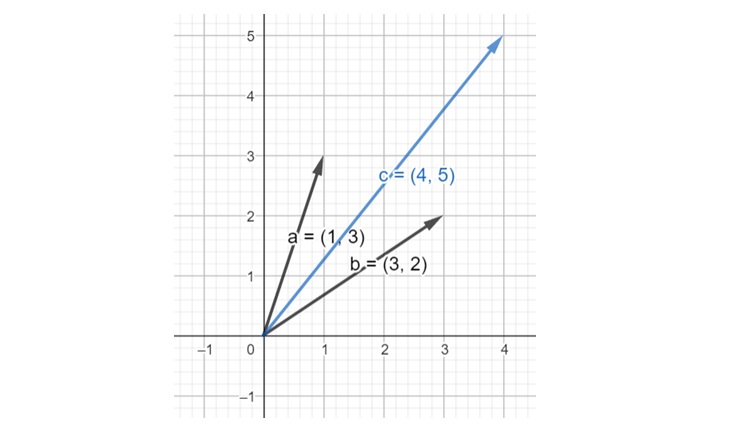
Here, the two vectors are a = (1, 3) and b = (3, 2), the addition result is c = (4, 5)
Vector Subtraction
We can subtract vectors too. It is like adding a vector in the opposite direction.
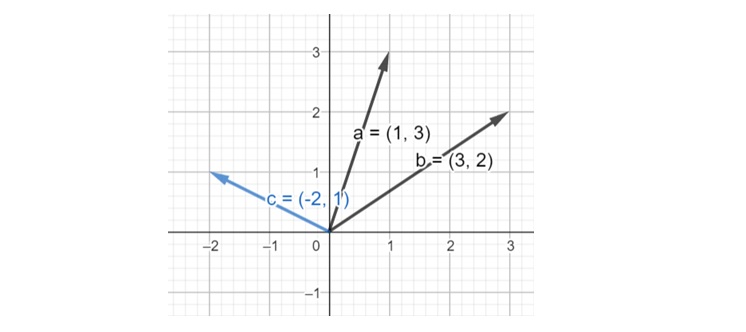
Here, the two vectors are a = (1, 3) and b = (3, 2), the addition result is c = (-2, 1)
Scaling
We can make a vector longer or shorter by multiplying it by a number. This changes its length but not its direction.
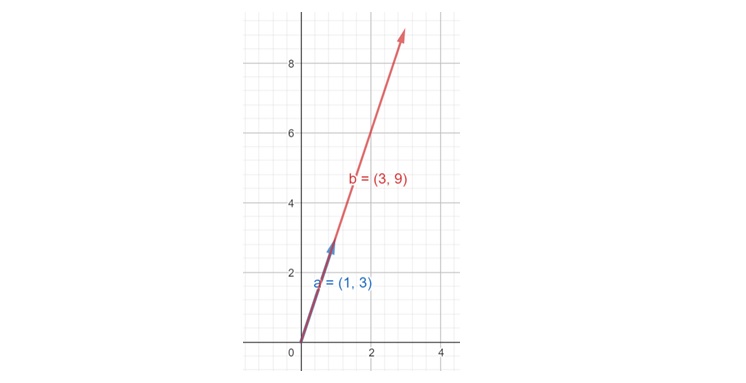
Here initial vector a = (1, 3) and after scaling by 3, b = (3, 9)
Coordinate Systems Cartesian Coordinates
We generally use a Cartesian coordinate system to describe vectors. In 2D, we use x and y coordinates. In 3D, we add a z coordinate.
Vector Representation in Coordinates
In 2D, we write a vector as (x, y) or as a column matrix −
$$\mathrm{a \:=\: \begin{bmatrix}x \\y \end{bmatrix}}$$
In 3D, we add a z component −
$$\mathrm{a \:=\: \begin{bmatrix}x \\y \\z \end{bmatrix}}$$
Let us now discuss the two types of vector products: the Dot Product and the Cross Product.
Dot Product
The dot product of two vectors gives us a single number. It is related to the vectors' lengths and the angle between them −
$$\mathrm{a \cdot b = |a| |b| \cos \phi}$$
Where φ is the angle between the vectors.
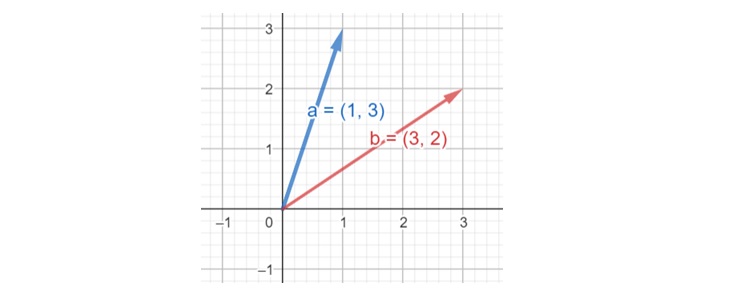
For these two vectors, the dot product returns 9.
Cross Product
The cross product is used with 3D vectors. It gives us a new vector that perpendicular to the two input vectors −
$$\mathrm{|a \times b| = |a| |b| \sin \phi}$$
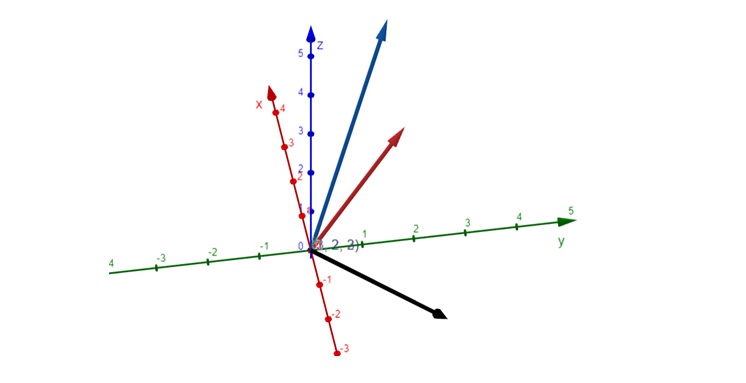
Here, a = (1, 2, 2) represented in blue, b = (3, 2, 3), represented in red, and cross product or perpendicular vector is (2, 3, -4) represented in black.
The length of this new vector is equal to the area of the parallelogram formed by the two input vectors.
Orthonormal Bases
Another interesting idea is the orthonormal basis. This is a set of vectors that are −
- At right angles to each other (orthogonal)
- Of unit length (normalized)
In 3D graphics, we often use three vectors (x, y, z) as an orthonormal basis. This forms a coordinate frame.
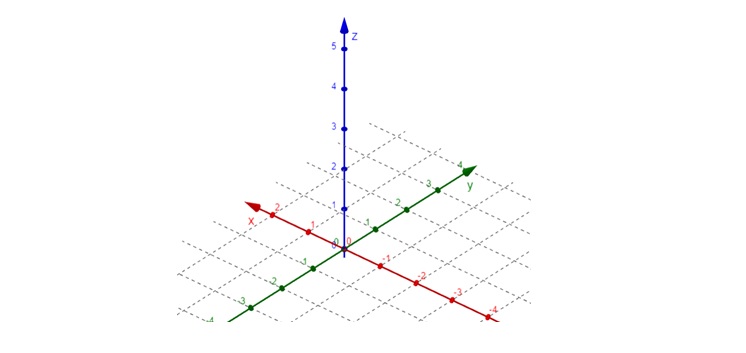
Right-Handed Coordinate System
In 3D graphics, we usually use a right-handed coordinate system. Imagine your right hand:
- Thumb points along the z-axis
- Index finger along the x-axis
- Middle finger along the y-axis
This helps us remember how the axes relate to each other.
Application of Vectors in Graphics
Vectors help us move, rotate, and scale objects in our 3D scenes. We use vectors to calculate how light interacts with surfaces in our 3D models. Vectors define where our virtual camera is and where it's looking.
Conclusion
In this chapter, we covered what vectors are and how they are represented. We also understood vector operations like addition, subtraction, and scaling. We looked at coordinate systems and how to represent vectors in them. We also discussed the two vector products: the dot product and cross product. Finally, we understood orthonormal bases and the right-handed coordinate system.
