- Tcl - Home
- Tcl - Overview
- Tcl - Environment Setup
- Tcl - Special Variables
- Tcl - Basic Syntax
- Tcl - Commands
- Tcl - Data Types
- Tcl - Variables
- Tcl - Operators
- Tcl - Decisions
- Tcl - Loops
- Tcl - Arrays
- Tcl - Strings
- Tcl - Lists
- Tcl - Dictionary
- Tcl - Procedures
- Tcl - Packages
- Tcl - Namespaces
- Tcl - File I/O
- Tcl - Error Handling
- Tcl - Built-in Functions
- Tcl - Regular Expressions
- Tk - Overview
- Tk - Environment
- Tk - Special Variables
- Tk - Widgets Overview
- Tk - Basic Widgets
- Tk - Layout Widgets
- Tk - Selection Widgets
- Tk - Canvas Widgets
- Tk - Mega Widgets
- Tk - Fonts
- Tk - Images
- Tk - Events
- Tk - Windows Manager
- Tk - Geometry Manager
- Tcl/Tk Useful Resources
- Tcl/Tk - Quick Guide
- Tcl/Tk - Useful Resources
- Tcl/Tk - Discussion
Tk - Scale Widget
Scale widget is used to choose a numeric value through sliders. The syntax for scale widget is shown below −
scale scaleName options
Options
The options available for the scale widget are listed below in the following table −
| Sr.No. | Syntax & Description |
|---|---|
| 1 | -background color Used to set background color for widget. |
| 2 | -borderwidth width Used to draw with border in 3D effects. |
| 3 | -font fontDescriptor Used to set font for widget. |
| 4 | -foreground color Used to set foreground color for widget. |
| 5 | -from number Range start value for widget. |
| 6 | -variable varName Variable associated with the widget. When the text of widget changes, the variable is set to text of widget. |
| 7 | -length number Sets the length for widget. |
| 8 | -orien orientation Sets the orientation for widget. It can be either horizontal or vertical. |
| 9 | -relief condition Sets the 3D relief for this widget. The condition may be raised, sunken, flat, ridge, solid, or groove. |
| 10 | -to number Range end value for widget. |
| 11 | -command command Procedure to be executed on action. |
A simple example for scale widget is shown below −
#!/usr/bin/wish

proc scaleMe {mywidget scaleValue} {
   $mywidget configure -length $scaleValue
}
pack [scale .s2  -from 100.0 -to 200.0 -length 100 -background yellow -borderwidth 5
   -font {Helvetica -18 bold} -foreground red -width 40 -relief ridge -orien horizontal
   -variable a -command "scaleMe .s2" ]
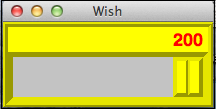
When we run the above program, we will get the following output.
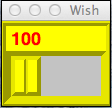
When we scroll the scale to maximum, we will get the following output.