- Spring MVC - Home
- Spring MVC - Overview
- Spring MVC - Environment Setup
- Spring MVC - Hello World Example
Spring MVC - Form Handling
Spring MVC - Form Tag library
- Spring MVC - Textbox
- Spring MVC - Password
- Spring MVC - Textarea
- Spring MVC - Checkbox
- Spring MVC - Checkboxes
- Spring MVC - Radiobutton
- Spring MVC - Radiobuttons
- Spring MVC - Dropdown
- Spring MVC - Listbox
- Spring MVC - Hidden
- Spring MVC - Errors
- Spring MVC - Upload
Spring MVC - Handler Mapping
Spring MVC - Controller
- Spring MVC - Multi Action Controller
- Properties Method Name Resolver
- Parameter Method Name Resolver
- Parameterizable View Controller
Spring MVC - View Resolver
- Internal Resource View Resolver
- Spring MVC - Xml View Resolver
- Resource Bundle View Resolver
- Multiple Resolver Mapping
Spring MVC - Integration
- Spring MVC - Hibernate Validator
- Spring MVC - Generate RSS Feed
- Spring MVC - Generate XML
- Spring MVC - Generate JSON
- Spring MVC - Generate Excel
- Spring MVC - Generate PDF
- Spring MVC - Using log4j
Spring Q & A
Spring MVC Useful Resources
Spring MVC - Generate Excel Example
The following example shows how to generate Excel using the Spring Web MVC Framework.
To start with, let us have a working Eclipse IDE in place and consider the following steps to develop a Dynamic Form based Web Application using Spring Web Framework −
| Step | Description |
|---|---|
| 1 | Create a project with a name hello under a package com.tutorialspoint as explained in the Spring MVC - Hello World Example chapter. |
| 2 | Create Java class UserExcelView and ExcelController under the com.tutorialspoint package. |
| 3 | Add dependency for Apache POI libraries in POM.xml. |
| 5 | The final step is to create the content of the source and configuration files and export the application as explained below. |
pom.xml
<?xml version="1.0" encoding="UTF-8"?>
<project xmlns="http://maven.apache.org/POM/4.0.0" xmlns:xsi="http://www.w3.org/2001/XMLSchema-instance"
   xsi:schemaLocation="http://maven.apache.org/POM/4.0.0 http://maven.apache.org/xsd/maven-4.0.0.xsd">
   <modelVersion>4.0.0</modelVersion>
   <groupId>com.tutorialspoint</groupId>
   <artifactId>hello</artifactId>
   <version>0.0.1-SNAPSHOT</version>
   <packaging>war</packaging>
   <name>hello Maven Webapp</name>
   <url>http://www.tutorialspoint.com</url>
   <properties>
      <project.build.sourceEncoding>UTF-8</project.build.sourceEncoding>
      <maven.compiler.source>24</maven.compiler.source>
      <maven.compiler.target>24</maven.compiler.target>
      <org.springframework.version>7.0.0-M9</org.springframework.version>
   </properties>
   <dependencies>
      <dependency>
         <groupId>junit</groupId>
         <artifactId>junit</artifactId>
         <version>4.13.1</version>
         <scope>test</scope>
      </dependency>
      <dependency>
         <groupId>jakarta.servlet</groupId>
         <artifactId>jakarta.servlet-api</artifactId>
         <version>6.0.0</version>
         <scope>provided</scope>
      </dependency>
      <dependency>
         <groupId>org.springframework</groupId>
         <artifactId>spring-context</artifactId>
         <version>${org.springframework.version}</version>
         <scope>compile</scope>
      </dependency>
      <dependency>
         <groupId>org.springframework</groupId>
         <artifactId>spring-webmvc</artifactId>
         <version>${org.springframework.version}</version>
         <scope>compile</scope>
      </dependency>
      <dependency>
         <groupId>com.rometools</groupId>
         <artifactId>rome</artifactId>
         <version>2.1.0</version>
      </dependency>
      <dependency>
         <groupId>org.apache.poi</groupId>
         <artifactId>poi</artifactId>
         <version>5.4.1</version>
      </dependency>
      <dependency>
         <groupId>org.apache.poi</groupId>
         <artifactId>poi-ooxml</artifactId>
         <version>5.4.1</version>
      </dependency>
   </dependencies>
   <build>
      <finalName>hello</finalName>
      <pluginManagement>
         <plugins>
            <plugin>
               <artifactId>maven-clean-plugin</artifactId>
               <version>3.4.0</version>
            </plugin>
            <plugin>
               <artifactId>maven-resources-plugin</artifactId>
               <version>3.3.1</version>
            </plugin>
            <plugin>
               <artifactId>maven-compiler-plugin</artifactId>
               <version>3.13.0</version>
            </plugin>
            <plugin>
               <artifactId>maven-surefire-plugin</artifactId>
               <version>3.3.0</version>
            </plugin>
            <plugin>
               <artifactId>maven-war-plugin</artifactId>
               <version>3.4.0</version>
            </plugin>
            <plugin>
            <artifactId>maven-install-plugin</artifactId>
               <version>3.1.2</version>
            </plugin>
            <plugin>
               <artifactId>maven-deploy-plugin</artifactId>
               <version>3.1.2</version>
            </plugin>
         </plugins>
      </pluginManagement>
   </build>
</project>
ExcelController.java
package com.tutorialspoint;

import java.util.HashMap;
import java.util.Map;

import org.springframework.stereotype.Controller;
import org.springframework.web.bind.annotation.GetMapping;
import org.springframework.web.servlet.ModelAndView;

@Controller
public class ExcelController {

   @GetMapping("/excel")
   protected ModelAndView getExcel() throws Exception {
      //user data
      Map<String,String> userData = new HashMap<String,String>();
      userData.put("1", "Mahesh");
      userData.put("2", "Suresh");
      userData.put("3", "Ramesh");
      userData.put("4", "Naresh");
      return new ModelAndView(new UserExcelView(),"userData",userData);
   }
}
UserExcelView.java
package com.tutorialspoint;

import java.util.Map;

import org.apache.poi.ss.usermodel.Row;
import org.apache.poi.ss.usermodel.Sheet;
import org.apache.poi.ss.usermodel.Workbook;
import org.springframework.web.servlet.view.document.AbstractXlsxView;

import jakarta.servlet.http.HttpServletRequest;
import jakarta.servlet.http.HttpServletResponse;

public class UserExcelView extends AbstractXlsxView {
   @Override
   protected void buildExcelDocument(Map<String, Object> model, Workbook workbook, HttpServletRequest request,
      HttpServletResponse response) throws Exception {
      Map<String,String> userData = (Map<String,String>) model.get("userData");
      //create a wordsheet
      Sheet sheet = workbook.createSheet("User Report");

      Row header = sheet.createRow(0);
      header.createCell(0).setCellValue("Roll No");
      header.createCell(1).setCellValue("Name");

      int rowNum = 1;
      for (Map.Entry<String, String> entry : userData.entrySet()) {
         //create the row data
         Row row = sheet.createRow(rowNum++);
         row.createCell(0).setCellValue(entry.getKey());
         row.createCell(1).setCellValue(entry.getValue());
      }
   }
}
Here, we have created an ExcelController and an ExcelView. Apache POI library deals with Microsoft Office file formats and will convert the data to an excel document.
hello-servlet.xml
<beans xmlns = "http://www.springframework.org/schema/beans"
   xmlns:context = "http://www.springframework.org/schema/context"
   xmlns:mvc = "http://www.springframework.org/schema/mvc"
   xmlns:xsi = "http://www.w3.org/2001/XMLSchema-instance"
   xsi:schemaLocation = "
   http://www.springframework.org/schema/beans
   http://www.springframework.org/schema/beans/spring-beans-3.0.xsd
   http://www.springframework.org/schema/context
   http://www.springframework.org/schema/context/spring-context-3.0.xsd
   http://www.springframework.org/schema/mvc
   http://www.springframework.org/schema/mvc/spring-mvc-3.0.xsd">

   <context:component-scan base-package = "com.tutorialspoint" />
   <mvc:annotation-driven />
</beans>
Output
Once you are done with creating source and configuration files, export your application. Right click on your application, use Run As → Maven Install option and save your hello.war file in Tomcat's webapps folder.
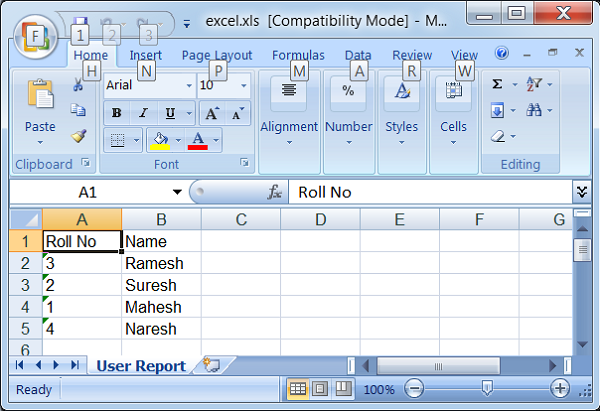
Now, start the Tomcat server and make sure you are able to access other webpages from the webapps folder using a standard browser. Try a URL http://localhost:8080/hello/excel and we will see the following screen.