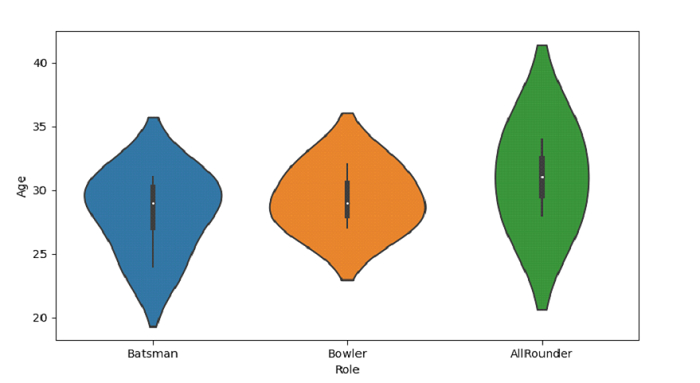
Python Pandas - Draw a vertical violinplot grouped by a categorical variable with Seaborn

A violin plot combines a box plot with a kernel density estimate to show the distribution of data. Seaborn's violinplot() function creates violin plots grouped by categorical variables, making it perfect for comparing distributions across different categories.

Understanding Violin Plots

Violin plots display:

  • Distribution shape − The width shows density at different values
  • Quartiles − Like a box plot, showing median and quartiles
  • Data range − The full extent of the data

Creating Sample Data

Let's create a dataset similar to cricket player data to demonstrate violin plots −

import seaborn as sns
import pandas as pd
import matplotlib.pyplot as plt
import numpy as np

# Create sample cricket data
np.random.seed(42)
roles = ['Batsman', 'Bowler', 'All-rounder'] * 20
ages = []

for role in roles:
    if role == 'Batsman':
        ages.append(np.random.normal(28, 3))
    elif role == 'Bowler':
        ages.append(np.random.normal(26, 4))
    else:  # All-rounder
        ages.append(np.random.normal(30, 2.5))

# Create DataFrame
cricket_data = pd.DataFrame({
    'Role': roles,
    'Age': ages
})

print(cricket_data.head())
        Role        Age
0    Batsman  31.328212
1     Bowler  26.644974
2  All-rounder  29.951615
3    Batsman  33.909832
4     Bowler  23.763462

Basic Vertical Violin Plot

Create a violin plot with Role on x-axis and Age on y-axis −

import seaborn as sns
import pandas as pd
import matplotlib.pyplot as plt
import numpy as np

# Create sample data
np.random.seed(42)
roles = ['Batsman', 'Bowler', 'All-rounder'] * 20
ages = []

for role in roles:
    if role == 'Batsman':
        ages.append(np.random.normal(28, 3))
    elif role == 'Bowler':
        ages.append(np.random.normal(26, 4))
    else:
        ages.append(np.random.normal(30, 2.5))

cricket_data = pd.DataFrame({'Role': roles, 'Age': ages})

# Create violin plot
plt.figure(figsize=(8, 6))
sns.violinplot(x='Role', y='Age', data=cricket_data)
plt.title('Age Distribution by Player Role')
plt.ylabel('Age (years)')
plt.show()
A violin plot showing age distributions for different cricket player roles, with each role displaying its characteristic distribution shape.

Customizing the Violin Plot

Add colors and styling for better visualization −

import seaborn as sns
import pandas as pd
import matplotlib.pyplot as plt
import numpy as np

# Create sample data
np.random.seed(42)
roles = ['Batsman', 'Bowler', 'All-rounder'] * 20
ages = []

for role in roles:
    if role == 'Batsman':
        ages.append(np.random.normal(28, 3))
    elif role == 'Bowler':
        ages.append(np.random.normal(26, 4))
    else:
        ages.append(np.random.normal(30, 2.5))

cricket_data = pd.DataFrame({'Role': roles, 'Age': ages})

# Create customized violin plot
plt.figure(figsize=(10, 6))
sns.violinplot(x='Role', y='Age', data=cricket_data, 
               palette='Set2', inner='quartile')
plt.title('Age Distribution by Player Role', fontsize=14)
plt.ylabel('Age (years)', fontsize=12)
plt.xlabel('Player Role', fontsize=12)
plt.grid(True, alpha=0.3)
plt.show()
A colorful violin plot with quartile lines inside each violin, showing clearer distribution patterns across player roles.

Key Parameters

Parameter Description Options
inner Interior marking style 'box', 'quartile', 'point', 'stick'
palette Color scheme 'Set1', 'Set2', 'viridis', etc.
split Split violin for comparison True/False

Conclusion

Violin plots effectively show data distribution shapes grouped by categories. Use sns.violinplot() with categorical x-axis and numeric y-axis to compare distributions across groups. The inner parameter controls quartile display styles.

---
Updated on: 2026-03-26T13:45:45+05:30

612 Views

Kickstart Your Career

Get certified by completing the course

Get Started
Advertisements