
- Python Design Patterns - Home
- Python Design Patterns - Introduction
- Python Design Patterns - Gist
- Model View Controller Pattern
- Python Design Patterns - Singleton
- Python Design Patterns - Factory
- Python Design Patterns - Builder
- Python Design Patterns - Prototype
- Python Design Patterns - Facade
- Python Design Patterns - Command
- Python Design Patterns - Adapter
- Python Design Patterns - Decorator
- Python Design Patterns - Proxy
- Chain of Responsibility Pattern
- Python Design Patterns - Observer
- Python Design Patterns - State
- Python Design Patterns - Strategy
- Python Design Patterns - Template
- Python Design Patterns - Flyweight
- Python Design Patterns - Abstract Factory
- Python Design Patterns - Object Oriented
- Object Oriented Concepts Implementation
- Python Design Patterns - Iterator
- Python Design Patterns - Dictionaries
- Python Design Patterns - Lists Data Structure
- Python Design Patterns - Sets
- Python Design Patterns - Queues
- Python Design Patterns - Strings & Serialization
- Python Design Patterns - Concurrency
- Python Design Patterns - Anti Pattern
- Python Design Patterns - Exception Handling
Python Design Patterns Resources
Python Design Patterns - Observer Pattern
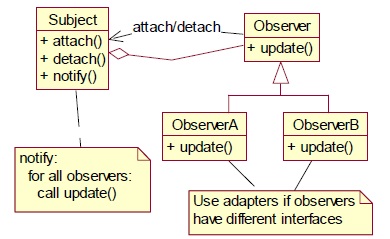
In this pattern, objects are represented as observers that wait for an event to trigger. An observer attaches to the subject once the specified event occurs. As the event occurs, the subject tells the observers that it has occurred.
The following UML diagram represents the observer pattern −
Example - How to implement the observer pattern?
Let us now see how to implement the observer pattern.
main.py
import threading
import time
import pdb

class Downloader(threading.Thread):

   def run(self):
      print('downloading')
      for i in range(1,5):
         self.i = i
         time.sleep(2)
         print('unfunf')
         return 'hello world'

class Worker(threading.Thread):
   def run(self):
      for i in range(1,5):
         print('worker running: %i (%i)' % (i, t.i))
         time.sleep(1)
         t.join()

         print('done')

t = Downloader()
t.start()

time.sleep(1)

t1 = Worker()
t1.start()

t2 = Worker()
t2.start()

t3 = Worker()
t3.start()
Output
The above program generates the following output −
downloading
worker running: 1 (1)
worker running: 1 (1)
worker running: 1 (1)
unfunf
done
done
worker running: 2 (1)
worker running: 2 (1)
done
worker running: 2 (1)
done
done
worker running: 3 (1)
worker running: 3 (1)
done
worker running: 3 (1)
done
done
worker running: 4 (1)
worker running: 4 (1)
done
worker running: 4 (1)
done
done
done
Explanation
The above code explains the procedure of downloading a particular result. As per the observer pattern logic, every object is treated as observer. It prints the output when event is triggered.
Advertisements