
- WML - Home
- WML - Overview
- WML - Environment
- WML - Syntax
- WML - Elements
- WML - Comments
- WML - Variables
- WML - Formatting
- WML - Fonts
- WML - Images
- WML - Tables
- WML - Links
- WML - Tasks
- WML - Inputs
- WML - Submit Data
- WML - Server Scripts
- WML - Events
- WML - Timer
- WML - Template
- WML - DTD
- WML2 - Tutorial
- WML Tools
- WAP - Emulators
- WML - Validator
- WML Useful Resources
- WML - Quick Guide
- WML - Useful Resources
- WML - Discussion
WML <a>Tag
The <a>...</a> tag pair can also be used to create an anchor link and always a preferred way of creating links.
You can enclose Text or image inside <a>...</a> tags.
Attributes:
This element supports the following attributes:
| Attribute | Value | Description |
|---|---|---|
| href | URL | Defines URL of the liked page |
| title | cdata | Defines a text identifying the link |
| xml:lang | language_code | Sets the language used in the element |
| class | class data | Sets a class name for the element. |
| id | element ID | A unique ID for the element. |
Example:
Following is the example showing usage of this element.
<?xml version="1.0"?>
<!DOCTYPE wml PUBLIC "-//WAPFORUM//DTD WML 1.2//EN"
"http://www.wapforum.org/DTD/wml12.dtd">

<wml>

<card title="A Element">
<p> Link to Next Page:
   <a href="nextpage.wml">Next Page</a>
</p>
</card>

</wml>
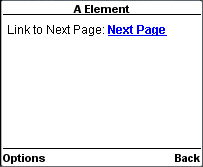
This will produce the following result:
Advertisements