
- Sass - Home
- Sass - Overview
- Sass - Installation
- Sass - Syntax
- Using Sass
- Sass - CSS Extensions
- Sass - Comments
- Sass - Script
- Sass - @-Rules and Directives
- Control Directives & Expressions
- Sass - Mixin Directives
- Sass - Function Directives
- Sass - Output Style
- Extending Sass
Sass - @if Directive
Description
The @if directive accepts the SassScript expressions and uses the nested styles whenever the result of the expression is anything other than false or null.
Syntax
@if expression { //CSS codes are written here }
Example
The following example demonstrates the use of @if directive in the SCSS file −
<html>
   <head>
      <title>Control Directives & Expressions</title>
      <link rel = "stylesheet" type = "text/css" href = "style.css"/>
   </head>

   <body>
      <div class = "container">
         <h2>Example for Control Directive & Expressions</h2>
         <p>SASS stands for Syntactically Awesome Stylesheet. </p>
      </div>
   </body>
</html>
Next, create file style.scss.
style.scss
p {
   @if 10 + 10 == 20   { border: 1px dotted;   }
   @if 7 < 2     { border: 2px solid;  }
   @if null    { border: 3px double; }
}
You can tell SASS to watch the file and update the CSS whenever SASS file changes, by using the following command −
sass --watch C:\ruby\lib\sass\style.scss:style.css
Next, execute the above command; it will create the style.css file automatically with the following code −
style.css
p {
   border: 1px dotted;
}
Output
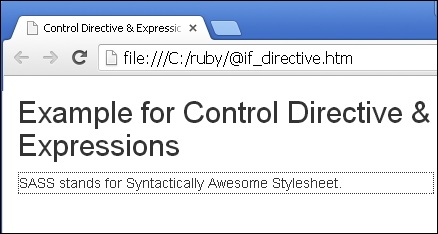
Let us carry out the following steps to see how the above given code works −
Save the above given html code in @if_directive.html file.
Open this HTML file in a browser, an output as below gets displayed
sass_control_directives_expressions.htm
Advertisements