
Article Categories
- All Categories
-
 Data Structure
-
 Networking
-
 RDBMS
RDBMS
-
 Operating System
-
 Java
Java
-
 MS Excel
-
 iOS
iOS
-
 HTML
HTML
-
 CSS
CSS
-
 Android
-
 Python
-
 C Programming
-
 C++
C++
-
 C#
C#
-
 MongoDB
-
 MySQL
MySQL
-
 Javascript
-
 PHP
PHP
-
 Economics & Finance
Selected Reading
Read a specific bit of a number with Arduino
Each number has a specific binary representation. For example, 8 can be represented as 0b1000, 15 can be represented as 0b1111, and so on. If you wish to read a specific bit of a number, Arduino has an inbuilt method for it.
Syntax
bitRead(x, index)
where, x is the number whose bits you are reading, index is the bit to read. 0 corresponds to least significant (right-most) bit, and so on.
This function returns either 0 or 1 depending on the value of that bit in that number.
Example
The following example will illustrate the use of this function −
void setup() {
   // put your setup code here, to run once:
   Serial.begin(9600);
   Serial.println();
   int x = 8;

   Serial.println(bitRead(x,0));
   Serial.println(bitRead(x,1));
   Serial.println(bitRead(x,2));
   Serial.println(bitRead(x,3));
   Serial.println(bitRead(x,4));
   Serial.println(bitRead(x,5));
   Serial.println(bitRead(x,6));
   Serial.println(bitRead(x,7));
}

void loop() {
   // put your main code here, to run repeatedly:
}
Output
The Serial Monitor output is shown below −
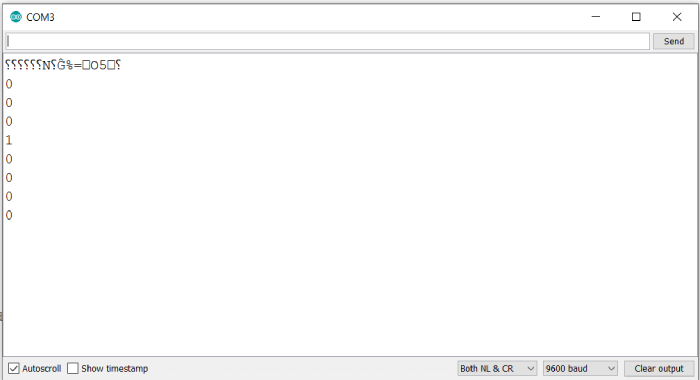
As you can see, only the bit in position 3 is 1, while all others are 0, which corresponds to the binary representation of 8: 0b00001000

Updated on: 2021-05-31T15:00:22+05:30
3K+ Views

Advertisements