
Article Categories
- All Categories
-
 Data Structure
-
 Networking
-
 RDBMS
RDBMS
-
 Operating System
-
 Java
Java
-
 MS Excel
-
 iOS
iOS
-
 HTML
HTML
-
 CSS
CSS
-
 Android
-
 Python
-
 C Programming
-
 C++
C++
-
 C#
C#
-
 MongoDB
-
 MySQL
MySQL
-
 Javascript
-
 PHP
PHP
-
 Economics & Finance
Selected Reading
Print new line and tab in Arduino
In order to print a newline, you can either introduce the '
' character in your text, or use Serial.println() instead of Serial.print()
An example code is given below −
Example
void setup() {
   // put your setup code here, to run once:
   Serial.begin(9600);
   Serial.println();
   Serial.print("This is line1\nThis is line2<br>");
   Serial.println("This is line3");
   Serial.println("This is line4");
}
void loop() {
   // put your main code here, to run repeatedly:

}
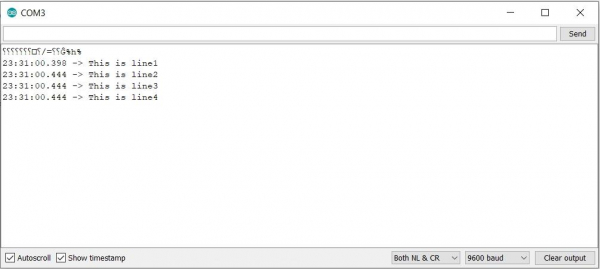
The Serial Monitor output for the above code is −
Output
In order to add a tab space, you can introduce '\t' in your code.
An example code is given below −
Example
void setup() {
   // put your setup code here, to run once:
   Serial.begin(9600);
   Serial.println();
   Serial.print("This is left half\tThis is right half<br>");
}
void loop() {
   // put your main code here, to run repeatedly:

}
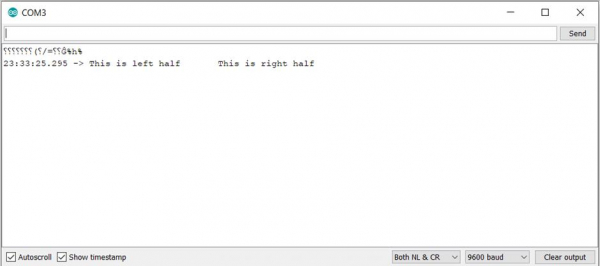
The corresponding Serial Monitor output is −
Output

Updated on: 2021-03-23T11:29:44+05:30
7K+ Views

Advertisements