
Article Categories
- All Categories
-
 Data Structure
-
 Networking
-
 RDBMS
RDBMS
-
 Operating System
-
 Java
Java
-
 MS Excel
-
 iOS
iOS
-
 HTML
HTML
-
 CSS
CSS
-
 Android
-
 Python
-
 C Programming
-
 C++
C++
-
 C#
C#
-
 MongoDB
-
 MySQL
MySQL
-
 Javascript
-
 PHP
PHP
Selected Reading
How to reduce the color using Iterator Method in OpenCV?
OpenCV has C++ STL compatible 'Mat iterator' class. Using this 'Mat iterator' class, we can access pixels very easily. We have to create an object of 'Mat iterator' class. We can do it as 'Mat_
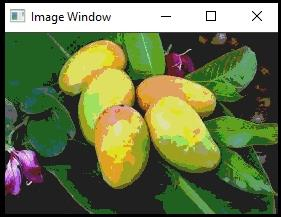
The following program demonstrates how to reduce the color using Iterator Method in OpenCV.
Example
#include#include using namespace std;//Declaring std namespace using namespace cv;//Declaring cv namespace void reducing_Color(Mat& image, int div = 64){ //Declaring the function// Mat_ ::iterator iterator_start;//Declaring starting iterator// iterator_start = image.begin ();//Obtain iterator at initial position// Mat_ ::iterator iterator_end;//Declaring ending iterator// iterator_end = image.end ();//Obtain iterator an end position// for (; iterator_start != iterator_end; iterator_start++){ //Loop for all pixels// (*iterator_start)[0] = (*iterator_start)[0] / div * div + div / 2;//Process pixels of first channel// (*iterator_start)[1] = (*iterator_start)[1] / div * div + div / 2;//Process pixels of second channel// (*iterator_start)[2] = (*iterator_start)[2] / div * div + div / 2;//Process pixels of third channel// } } int main() { Mat image;//taking an image matrix// image = imread("mango.jpg");//loading an image// namedWindow("Image Window");//Declaring another window// reducing_Color(image);//calling the function// imshow("Image Window", image);//showing the image with reduced color// waitKey(0); return 0; }
Output

Updated on: 2021-03-10T08:15:47+05:30
367 Views

Advertisements