
Article Categories
- All Categories
-
 Data Structure
-
 Networking
-
 RDBMS
RDBMS
-
 Operating System
-
 Java
Java
-
 MS Excel
-
 iOS
iOS
-
 HTML
HTML
-
 CSS
CSS
-
 Android
-
 Python
-
 C Programming
-
 C++
C++
-
 C#
C#
-
 MongoDB
-
 MySQL
MySQL
-
 Javascript
-
 PHP
PHP
-
 Economics & Finance
Selected Reading
How to increase the font size of text in Arduino IDE?
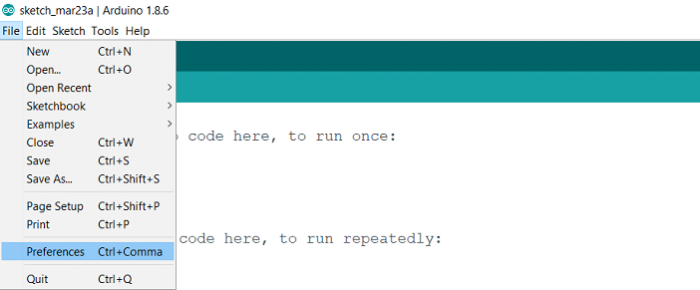
The default font size of Arduino IDE can be a bit too small for some developers. In order to increase the font size, go to File → Preferences.
In the dialog box that opens up, change the value of Editor Font size. The default value is 12. You can set it to a value you are comfortable with.
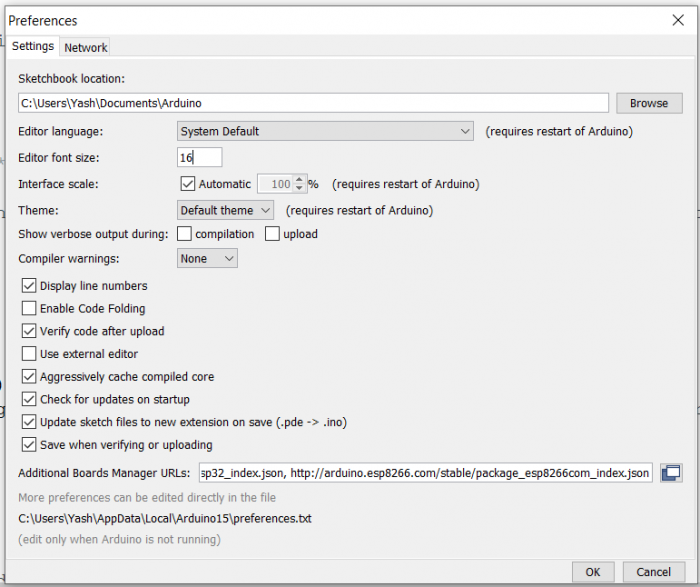
Click OK and the changes will reflect on your IDE immediately.

Updated on: 2021-05-29T13:03:31+05:30
1K+ Views

Advertisements