
Article Categories
- All Categories
-
 Data Structure
-
 Networking
-
 RDBMS
RDBMS
-
 Operating System
-
 Java
Java
-
 MS Excel
-
 iOS
iOS
-
 HTML
HTML
-
 CSS
CSS
-
 Android
-
 Python
-
 C Programming
-
 C++
C++
-
 C#
C#
-
 MongoDB
-
 MySQL
MySQL
-
 Javascript
-
 PHP
PHP
-
 Economics & Finance
Selected Reading
How to get the number of rows and columns of a JTable in Java Swing
To count the number of rows of a table, use the getRowCount() method −
table.getRowCount()
To count the number of columns of a table, use the getColumnCount() method −
table.getColumnCount()
The following is an example to get the number of rows and columns of a JTable −
Example
package my;
import java.awt.Font;
import javax.swing.JFrame;
import javax.swing.JScrollPane;
import javax.swing.JTable;
import javax.swing.table.DefaultTableModel;
public class SwingDemo {
   public static void main(String[] argv) throws Exception {
      DefaultTableModel tableModel = new DefaultTableModel();
      JTable table = new JTable(tableModel);
      tableModel.addColumn("Language/ Technology");
      tableModel.addColumn("Text Tutorial");
      tableModel.addColumn("Video Tutorial");
      tableModel.addColumn("Views");
      // prevent from resizing
      table.getTableHeader().setResizingAllowed(false);
      tableModel.addRow(new Object[] { "F#", "Yes", "No", "7890"});
      tableModel.addRow(new Object[] { "Blockchain", "Yes", "No", "10600"});
      tableModel.addRow(new Object[] { "SharePoint", "Yes", "Yes", "4900"});
      tableModel.addRow(new Object[] { "AWS", "No", "Yes", "8900"});
      tableModel.addRow(new Object[] { "Python", "Yes", "No", "6789"});
      tableModel.addRow(new Object[] { "Scala", "Yes", "No", "3400"});
      tableModel.addRow(new Object[] { "Swift", "No", "Yes", "9676"});
      tableModel.addRow(new Object[] { "C#", "Yes", "Yes", "1300"});
      tableModel.addRow(new Object[] { "NodeJS", "No", "Yes", "2350"});
      tableModel.addRow(new Object[] { "MVC", "Yes", "No", "1500"});
      tableModel.addRow(new Object[] { "ASP.NET", "Yes", "Yes", "3400"});
      tableModel.addRow(new Object[] { "Java", "Yes", "No", "9686"});
      tableModel.addRow(new Object[] { "jQuery", "Yes", "Yes", "4500"});
      System.out.println("Table rows = "+table.getRowCount());
      System.out.println("Table columns = "+table.getColumnCount());
      Font font = new Font("Verdana", Font.PLAIN, 12);
      table.setFont(font);
      JFrame frame = new JFrame();
      frame.setSize(600, 400);
      frame.add(new JScrollPane(table));
      frame.setVisible(true);
   }
}
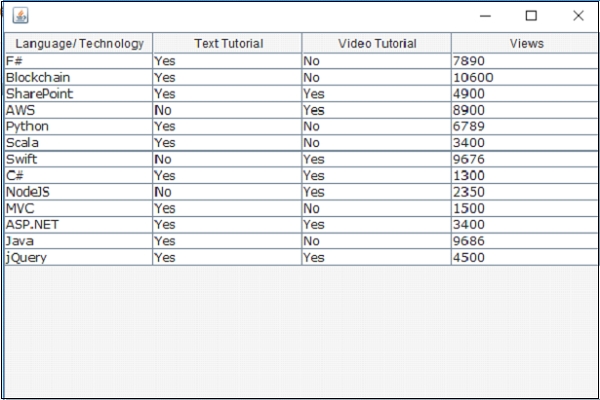
This will produce the following output displaying the table with rows and columns −
Output
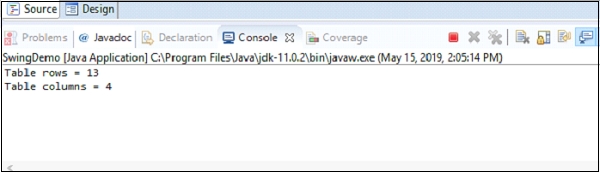
The count of rows and columns are displayed in the console as shown below −

Updated on: 2019-07-30T22:30:26+05:30
2K+ Views

Advertisements