
Article Categories
- All Categories
-
 Data Structure
-
 Networking
-
 RDBMS
RDBMS
-
 Operating System
-
 Java
Java
-
 MS Excel
-
 iOS
iOS
-
 HTML
HTML
-
 CSS
CSS
-
 Android
-
 Python
-
 C Programming
-
 C++
C++
-
 C#
C#
-
 MongoDB
-
 MySQL
MySQL
-
 Javascript
-
 PHP
PHP
Selected Reading
How to draw a line in OpenCV using C++?
To draw a line we need two points-the starting point and ending point. We also require a canvas to draw the line.
Using OpenCV, the matrix in our canvas, we need to define the line's starting and ending points. We require to assign a color to the line as well. The thickness of the line has to be explained too. If we want to draw a line using OpenCV, we need to declare a matrix, two points, and color and line thickness.
Using OpenCV we have to include
The basic syntax of this method is as follows −
Syntax
line(whiteMatrix, starting, ending, line_Color, thickness);
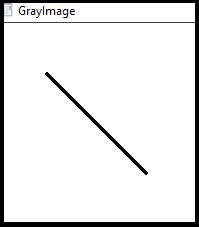
The following program shows how to draws a line on an image in OpenCV −
Example
#include#include #include using namespace cv; using namespace std; int main() { Mat whiteMatrix(200, 200, CV_8UC3, Scalar(255, 255, 255));//Declaring a white matrix// Point starting(50, 50);//Starting Point of the line Point ending(150, 150);//Ending Point of the line Scalar line_Color(0, 0, 0);//Color of the line int thickness = 2;//thickens of the line namedWindow("GrayImage");//Declaring a window to show the line line(whiteMatrix, starting, ending, line_Color, thickness);//using line() function to draw the line// imshow("GrayImage", whiteMatrix);//showing the line// waitKey(0);//Waiting for KeyStroke return 0; }
Output

Updated on: 2021-03-10T08:06:58+05:30
2K+ Views

Advertisements