
Article Categories
- All Categories
-
 Data Structure
-
 Networking
-
 RDBMS
RDBMS
-
 Operating System
-
 Java
Java
-
 MS Excel
-
 iOS
iOS
-
 HTML
HTML
-
 CSS
CSS
-
 Android
-
 Python
-
 C Programming
-
 C++
C++
-
 C#
C#
-
 MongoDB
-
 MySQL
MySQL
-
 Javascript
-
 PHP
PHP
Selected Reading
How to detect and track the motion of eyeball in OpenCV using C++?
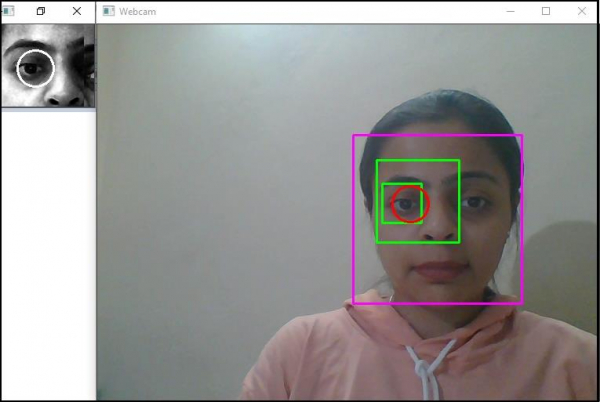
Here, we will learn how to detect and track the motion of eyeball in OpenCV.
The following program demonstrates to detect the eyeball and track the location.
Example
#include#include #include #include #include #include using namespace cv; using namespace std; Vec3f eyeBallDetection(Mat& eye, vector & circles) { vector sums(circles.size(), 0); for (int y = 0; y (y); for (int x = 0; x (*data); for (int i = 0; i centers; Point track_Eyeball; Point makeStable(vector & points, int iteration) { float sum_of_X = 0; float sum_of_Y = 0; int count = 0; int j = max(0, (int)(points.size() - iteration)); int number_of_points = points.size(); for (j; j 0) { sum_of_X /= count; sum_of_Y /= count; } return Point(sum_of_X, sum_of_Y); } void eyeDetection(Mat& frame, CascadeClassifier& faceCascade, CascadeClassifier& eyeCascade) { Mat grayImage; cvtColor(frame, grayImage, COLOR_BGR2GRAY); equalizeHist(grayImage, grayImage); //Detecting the face// Mat inputImage = grayImage; vector storedFaces; float scaleFactor = 1.1; int minimumNeighbour = 2; Size minImageSize = Size(150, 150); faceCascade.detectMultiScale( inputImage, storedFaces, scaleFactor, minimumNeighbour, 0 | CASCADE_SCALE_IMAGE, minImageSize); if (storedFaces.size() == 0)return; Mat face = grayImage(storedFaces[0]); //Drawing rectangle around the detected face// int x = storedFaces[0].x; int y = storedFaces[0].y; int h = y + storedFaces[0].height; int w = x + storedFaces[0].width; rectangle(frame, Point(x, y), Point(w, h), Scalar(255, 0, 255), 2, 8, 0); //Detecting the eyes// Mat faceRegion = face; vector eyes; float eyeScaleFactor = 1.1; int eyeMinimumNeighbour = 2; Size eyeMinImageSize = Size(30, 30); eyeCascade.detectMultiScale(faceRegion, eyes, eyeScaleFactor, eyeMinimumNeighbour, 0 | CASCADE_SCALE_IMAGE, eyeMinImageSize); if (eyes.size() != 2)return; //Drawing the rectangle around the eyes// for (Rect& eye : eyes) { rectangle(frame, storedFaces[0].tl() + eye.tl(), storedFaces[0].tl() + eye.br(), Scalar(0, 255, 0), 2); } //Getting the left eye// Rect eyeRect = detectLeftEye(eyes); Mat eye = face(eyeRect); equalizeHist(eye, eye); //Applying Hough Circles to detect the circles in eye region// Mat hough_Circle_Input = eye; vector circles; int method = 3; int detect_Pixel = 1; int minimum_Distance = eye.cols / 8; int threshold = 250; int minimum_Area = 15; int minimum_Radius = eye.rows / 8; int maximum_Radius = eye.rows / 3; HoughCircles(hough_Circle_Input, circles, HOUGH_GRADIENT, detect_Pixel, minimum_Distance, threshold, minimum_Area, minimum_Radius, maximum_Radius); //Detecting the drawing circle that encloses the eyeball// if (circles.size() > 0) { Vec3f eyeball = eyeBallDetection(eye, circles); Point center(eyeball[0], eyeball[1]); centers.push_back(center); center = makeStable(centers, 5); track_Eyeball = center; int radius = (int)eyeball[2]; circle(frame, storedFaces[0].tl() + eyeRect.tl() + center, radius, Scalar(0, 0, 255), 2); circle(eye, center, radius, Scalar(255, 255, 255), 2); } cout > frame; eyeDetection(frame, faceCascade, eyeCascade); imshow("Webcam", frame); if (waitKey(30) >= 0) break; } return 0; }
Output


Updated on: 2021-03-10T09:16:37+05:30
595 Views

Advertisements