
Article Categories
- All Categories
-
 Data Structure
-
 Networking
-
 RDBMS
RDBMS
-
 Operating System
-
 Java
Java
-
 MS Excel
-
 iOS
iOS
-
 HTML
HTML
-
 CSS
CSS
-
 Android
-
 Python
-
 C Programming
-
 C++
C++
-
 C#
C#
-
 MongoDB
-
 MySQL
MySQL
-
 Javascript
-
 PHP
PHP
-
 Economics & Finance
Selected Reading
How to create the stacked bar plot using ggplot2 in R with labels on the plot?
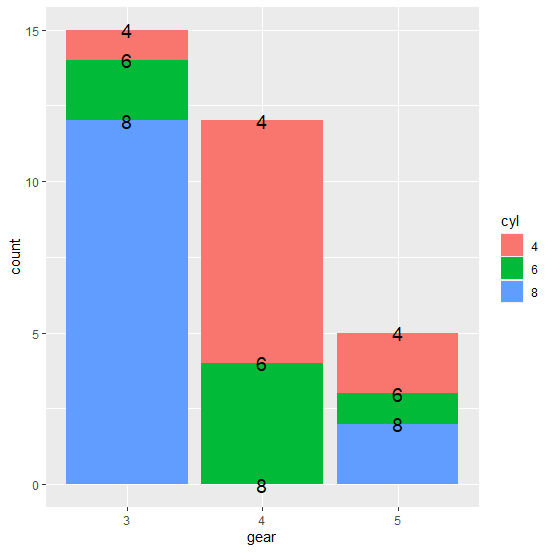
The creation of stacked bar plot using ggplot2 can be done with the help of position="stack" argument inside geom_bar function. If we want to create the stacked bar plot then geom_text function will be used with the same position argument and the aes to define the labels as shown in the below example.
Example
df<−data.frame(with(mtcars,table(cyl,gear)))
df
Output
cyl gear Freq
1 4 3 1
2 6 3 2
3 8 3 12
4 4 4 8
5 6 4 4
6 8 4 0
7 4 5 2
8 6 5 1
9 8 5 2
Loading ggplot2 package and creating the stacked bar plot −
Example
library(ggplot2)
Output
ggplot(df,aes(gear,fill=cyl))+geom_bar(aes(weight=Freq),position="stack")+geom_text(position="stack",aes(gear,Freq,label=cyl),size=5)
Output

Updated on: 2026-03-11T22:50:55+05:30
3K+ Views

Advertisements