
Article Categories
- All Categories
-
 Data Structure
-
 Networking
-
 RDBMS
RDBMS
-
 Operating System
-
 Java
Java
-
 MS Excel
-
 iOS
iOS
-
 HTML
HTML
-
 CSS
CSS
-
 Android
-
 Python
-
 C Programming
-
 C++
C++
-
 C#
C#
-
 MongoDB
-
 MySQL
MySQL
-
 Javascript
-
 PHP
PHP
Selected Reading
How to create a database on command line in MySQL?
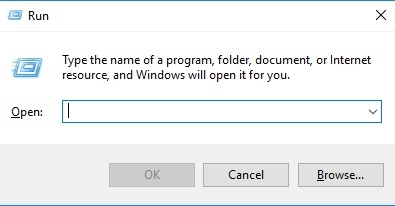
First, you need to open the command prompt. You can open using shortcut windows+R key.
The screenshot is as follows −
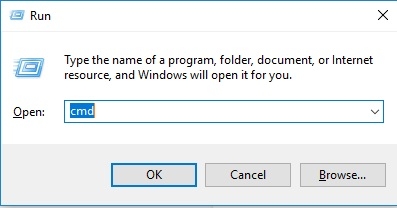
Now type CMD and press OK button −
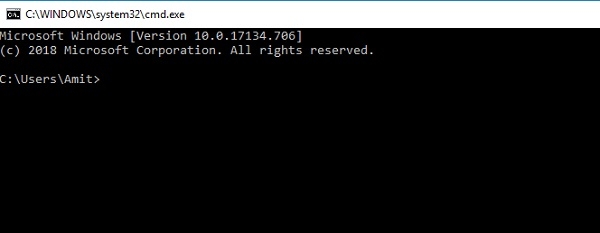
Now the following command prompt would be visible −
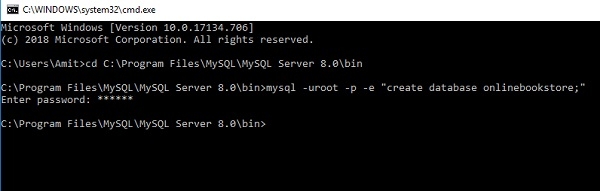
Now reach the MySQL bin directory. The screenshot is as follows −

Following is the query to run MySQL in the command line to create a database −
Now you can check the database is created or not using SHOW DATABASES command −
mysql> SHOW DATABASES;
This will produce the following output −
+---------------------------+
| Database                  |
+---------------------------+
| bothinnodbandmyisam       |
| business                  |
| commandline               |
| customer_tracker_database |
| customertracker           |
| database1                 |
| databasesample            |
| demo                      |
| education                 |
| hb_student_tracker        |
| hello                     |
| information_schema        |
| javadatabase2             |
| javasampledatabase        |
| login                     |
| mybusiness                |
| mydatabase                |
| mysql                     |
| onetomanyrelationship     |
| onlinebookstore           |
| performance_schema        |
| rdb                       |
| sample                    |
| sampledatabase            |
| schemasample              |
| sys                       |
| test                      |
| test3                     |
| tracker                   |
| universitydatabase        |
| web                       |
| webtracker                |
+---------------------------+
32 rows in set (0.00 sec)

Updated on: 2019-07-30T22:30:26+05:30
4K+ Views

Advertisements