
Article Categories
- All Categories
-
 Data Structure
-
 Networking
-
 RDBMS
RDBMS
-
 Operating System
-
 Java
Java
-
 MS Excel
-
 iOS
iOS
-
 HTML
HTML
-
 CSS
CSS
-
 Android
-
 Python
-
 C Programming
-
 C++
C++
-
 C#
C#
-
 MongoDB
-
 MySQL
MySQL
-
 Javascript
-
 PHP
PHP
-
 Economics & Finance
How to Copy a Selected Range to a New Workbook in Excel?
Have you experienced a situation where you want to copy selected data from the existing sheet to another sheet? If we try to do this manually, it will be a time-consuming process as we need to create a new workbook and then copy the data. We can automate the task with the help of a VBA application, as it can?t be completed directly in Excel. In this article, we will learn how to copy a selected range to a new workbook in Excel using the vba application.
Copying a Selected Range to A New Workbook
Here we will first open the VBA application, then insert the module, copy the below-mentioned code into the textbox, and run the code to complete our task. Let us look at a simple procedure for copying a selected range to a new workbook in Excel using the VBA application.
Step 1
Let us consider any Excel sheet, then select the data that you want to copy to the new sheet, and right-click on the sheet name and select view code to open the VBA application. Then in the VBA application, click on "Insert" and select "Module"
Select data > Right click > View code > Insert > Module
Step 2
Type the following program code in the textbox, as shown the image below.
Program
Sub AddNew()
'Updated By Nirmal
    Dim xWs As Worksheet
    Dim Rng As Range
    Set Rng = Application.Selection
    Application.Workbooks.Add
    Set xWs = Application.ActiveSheet
    Rng.Copy Destination:=xWs.Range("A4")
End Sub
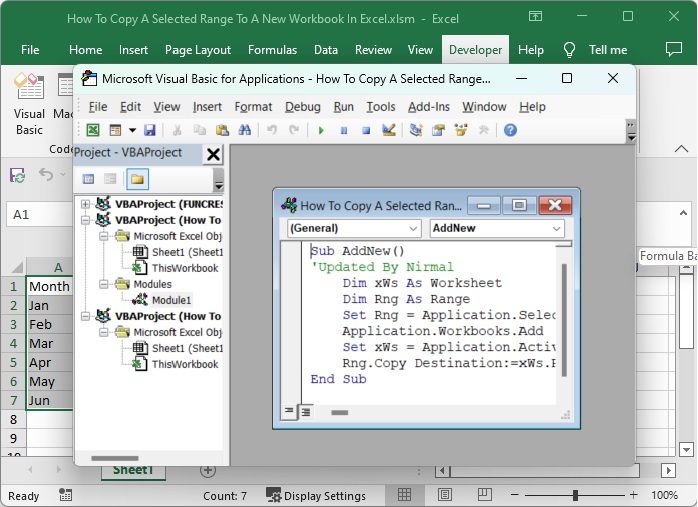
In the code, A4, is the cell where our data will be pasted in the new workbook.
Step 3
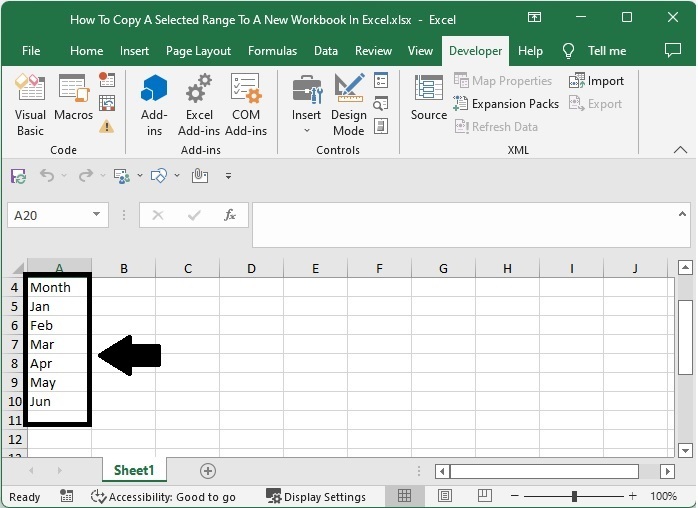
Then save the sheet as a macro-enabled workbook and click F5 to run the code; a new workbook will be created and selected data will be pasted from cell A4 as shown in the below image.
Conclusion
In this tutorial, we used a simple example to demonstrate how you can copy a selected range to a new workbook in Excel.

1K+ Views
