
Article Categories
- All Categories
-
 Data Structure
-
 Networking
-
 RDBMS
RDBMS
-
 Operating System
-
 Java
Java
-
 MS Excel
-
 iOS
iOS
-
 HTML
HTML
-
 CSS
CSS
-
 Android
-
 Python
-
 C Programming
-
 C++
C++
-
 C#
C#
-
 MongoDB
-
 MySQL
MySQL
-
 Javascript
-
 PHP
PHP
Selected Reading
How to add an active class to the current element with JavaScript?
To add an active class to the current element with JavaScript, the code is as follows −
Example
<!DOCTYPE html>
<html>
<head>
<meta name="viewport" content="width=device-width, initial-scale=1" />
<style>
   .btn {
      border: none;
      outline: none;
      padding: 10px 16px;
      background-color: #6ea2f0;
      cursor: pointer;
      color:white;
      font-size: 18px;
   }
   .active, .btn:hover {
      background-color: #666;
      color: white;
   }
</style>
</head>
<body>
<h1>Active Button Example</h1>
<div id="sampleDiv">
<button class="btn">Giraffe</button>
<button class="btn active">Cow</button>
<button class="btn">Lion</button>
<button class="btn">Leopard</button>
<button class="btn">Cheetah</button>
</div>
<h2>Press any of the above button to set it class to active</h2>
<script>
   var btns = document.querySelectorAll(".btn");
   Array.from(btns).forEach(item => {
      item.addEventListener("click", () => {
         var selected = document.getElementsByClassName("active");
         selected[0].className = selected[0].className.replace(" active", "");
         item.className += " active";
      });
   });
</script>
</body>
</html>
Output
The above code will produce the following output −
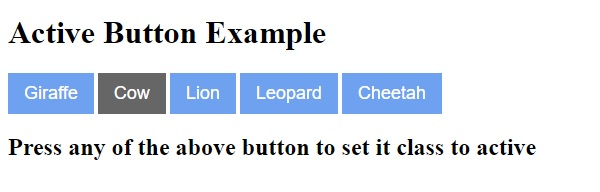
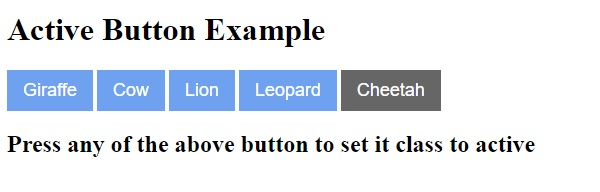
On clicking any other button −

Updated on: 2020-05-08T13:35:43+05:30
2K+ Views

Advertisements