
Article Categories
- All Categories
-
 Data Structure
-
 Networking
-
 RDBMS
RDBMS
-
 Operating System
-
 Java
Java
-
 MS Excel
-
 iOS
iOS
-
 HTML
HTML
-
 CSS
CSS
-
 Android
-
 Python
-
 C Programming
-
 C++
C++
-
 C#
C#
-
 MongoDB
-
 MySQL
MySQL
-
 Javascript
-
 PHP
PHP
-
 Economics & Finance
Selected Reading
How to add a new element in the XML using PowerShell?
Suppose we have a XML file as shown below.
      Gambardella, Matthew
      XML Developer's Guide
      Computer
      44.95
      2000-10-01
      An in-depth look at creating applications with XML.
We need to add a new node. So we will first load the XML file and then operate on it as shown below.
The below command will save the XML file to the variable.
$xmlfile = [XML](Get-Content C:\Temp\SampleXML.xml)
The below command will create a new XML element
$newelement = $xmlfile.CreateElement("book")
Once the element is created we need to append it to the specific node. Here we need to append a new element underneath the Catalog.
$xmlfile.catalog.AppendChild($newelement)
And the last part is to save the XML file using the below command.
$xmlfile.save('C:\Temp\SampleXML.xml')
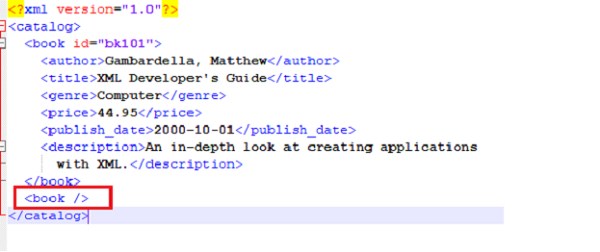
You can check the new book element is created.

Updated on: 2021-02-19T13:18:54+05:30
10K+ Views

Advertisements