
Article Categories
- All Categories
-
 Data Structure
-
 Networking
-
 RDBMS
RDBMS
-
 Operating System
-
 Java
Java
-
 MS Excel
-
 iOS
iOS
-
 HTML
HTML
-
 CSS
CSS
-
 Android
-
 Python
-
 C Programming
-
 C++
C++
-
 C#
C#
-
 MongoDB
-
 MySQL
MySQL
-
 Javascript
-
 PHP
PHP
-
 Economics & Finance
Selected Reading
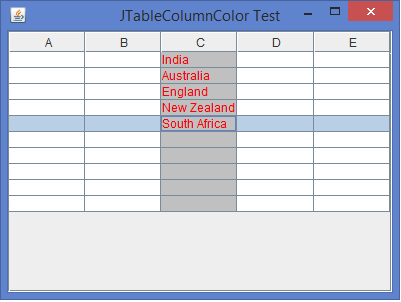
How can we set the background/foreground color for individual column of a JTable in Java?
A JTable is a subclass of JComponent class for displaying complex data structures. A JTable component can follow the Model View Controller (MVC) design pattern for displaying the data in rows and columns. A JTable can generate TableModelListener, TableColumnModelListener, ListSelectionListener, CellEditorListener, RowSorterListener interfaces. We can change the background and foreground color for each column of a JTable by customizing the DefaultTableCellRenderer class and it has only one method getTableCellRendererComponent() to implement it.
Example
import java.awt.*;
import javax.swing.*;
import javax.swing.table.*;
public class JTableColumnColorTest extends JFrame {
   private JTable table;
   private TableColumn tColumn;
   public JTableColumnColorTest() {
      setTitle("JTableColumnColor Test");
      table = new JTable(10, 5);
      tColumn = table.getColumnModel().getColumn(2);
      tColumn.setCellRenderer(new ColumnColorRenderer(Color.lightGray, Color.red));
      add(new JScrollPane(table), BorderLayout.CENTER);
      setSize(400, 300);
      setDefaultCloseOperation(JFrame.EXIT_ON_CLOSE);
      setLocationRelativeTo(null);
      setVisible(true);
   }
   public static void main(String [] args) {
      new JTableColumnColorTest();
   }
}
<strong>// Customize the code to set the background and foreground color for each column of a JTable</strong>
class ColumnColorRenderer extends DefaultTableCellRenderer {
   Color backgroundColor, foregroundColor;
   public ColumnColorRenderer(Color backgroundColor, Color foregroundColor) {
      super();
      this.backgroundColor = backgroundColor;
      this.foregroundColor = foregroundColor;
   }
   public Component getTableCellRendererComponent(JTable table, Object value, boolean isSelected,   boolean hasFocus, int row, int column) {
      Component cell = super.getTableCellRendererComponent(table, value, isSelected, hasFocus, row, column);
      cell.setBackground(backgroundColor);
      cell.setForeground(foregroundColor);
      return cell;
   }
}
Output

Updated on: 2020-02-10T12:52:14+05:30
4K+ Views

Advertisements