
Article Categories
- All Categories
-
 Data Structure
-
 Networking
-
 RDBMS
RDBMS
-
 Operating System
-
 Java
Java
-
 MS Excel
-
 iOS
iOS
-
 HTML
HTML
-
 CSS
CSS
-
 Android
-
 Python
-
 C Programming
-
 C++
C++
-
 C#
C#
-
 MongoDB
-
 MySQL
MySQL
-
 Javascript
-
 PHP
PHP
-
 Economics & Finance
Selected Reading
Change MySQL default character set to UTF-8 in my.cnf?
To change MySQL default character set to UTF-8 in my.cnf, firstly reach the location of my.cnf file.
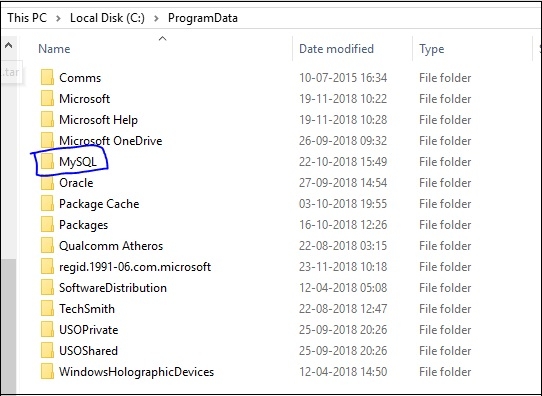
The following is the screenshot of “my.cnf” file. Firstly, open the C: directory and the “Program Data” folder −

Now, click on “MySQL” folder −
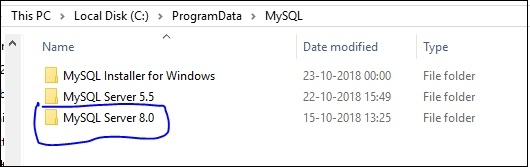
Now, click the MySQL Server 8.0 folder and open it −
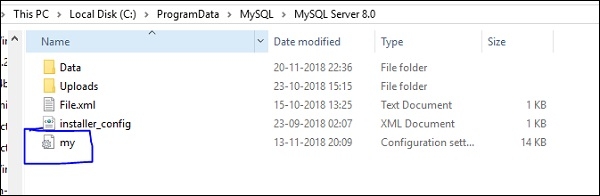
After opening MySQL Server 8.0, you will get “my.cnf” file location.
After opening my.cnf file, you will get the character-set. Open the file and the following contens are visible −
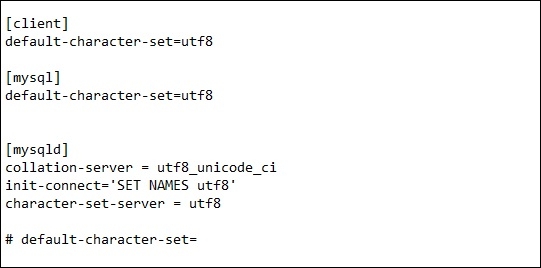
Now you can change the character-set to utf8.

Updated on: 2019-07-30T22:30:24+05:30
1K+ Views

Advertisements