
- Angular Highcharts - Home
- Angular Highcharts - Overview
- Environment Setup
- Configuration Syntax
- Angular Highcharts - Line Charts
- Angular Highcharts - Area Charts
- Angular Highcharts - Bar Charts
- Angular Highcharts - Column Charts
- Angular Highcharts - Pie Charts
- Angular Highcharts - Scatter Chart
- Angular Highcharts - Dynamic Charts
- Angular Highcharts - Combinations
- Angular Highcharts - 3D Charts
- Angular Highcharts - Map Charts
Angular Highcharts - Basic Bar Chart
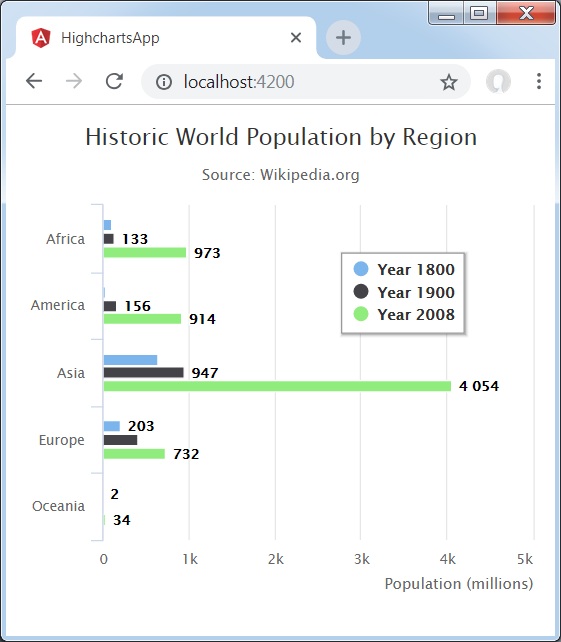
Following is an example of a Bar Chart.
We have already seen the configurations used to draw a chart in Highcharts Configuration Syntax chapter. Now, let us see an example of a basic bar chart. We will also understand additional configuration. We have changed the type attribute in chart.
chart
Configure the chart type to be 'bar' based. chart.type decides the series type for the chart. Here, the default value is "line".
var chart = {
   type: 'bar'
};
Example
app.component.ts
import { Component } from '@angular/core';
import * as Highcharts from 'highcharts';
@Component({
   selector: 'app-root',
   templateUrl: './app.component.html',
   styleUrls: ['./app.component.css']
})
export class AppComponent {
   highcharts = Highcharts;
   chartOptions = {
      chart: {
         type: 'bar'
      },
      title: {
         text: 'Historic World Population by Region'
      },
      subtitle : {
         text: 'Source: Wikipedia.org'
      },
      legend : {
         layout: 'vertical',
         align: 'left',
         verticalAlign: 'top',
         x: 250,
         y: 100,
         floating: true,
         borderWidth: 1,

         backgroundColor: (
            (Highcharts.theme && Highcharts.theme.legendBackgroundColor) ||
              '#FFFFFF'), shadow: true
         },
         xAxis:{
            categories: ['Africa', 'America', 'Asia', 'Europe', 'Oceania'], title: {
            text: null
         }
      },
      yAxis : {
         min: 0, title: {
            text: 'Population (millions)', align: 'high'
         },
         labels: {
            overflow: 'justify'
         }
      },
      tooltip : {
         valueSuffix: ' millions'
      },
      plotOptions : {
         bar: {
            dataLabels: {
               enabled: true
            }
         }
      },
      credits:{
         enabled: false
      },
      series: [
         {
            name: 'Year 1800',
            data: [107, 31, 635, 203, 2]
         },
         {
            name: 'Year 1900',
            data: [133, 156, 947, 408, 6]
         },
         {
            name: 'Year 2008',
            data: [973, 914, 4054, 732, 34]
         }
      ]
   };
}
Result
Verify the result.
angular_highcharts_bar_charts.htm
Advertisements